AMD iGPU Under Linux: A Story of Suffering with a Happy Ending (for NVIDIA)
AMD iGPU Under Linux: A Story About Freezes, Firmware Updates That Fix Nothing, and the Unexpected Realization That NVIDIA Just Works
I have an AMD iGPU. And I'm telling you, it's caused me more headaches than any NVIDIA GPU I've ever run under Linux. Believe it or not.
The integrated graphics of the Ryzen 7 7800X3D are, to put it mildly, "barely usable". Since I've owned this processor, the iGPU keeps producing so-called switch timeouts, page flip timeouts, and more, where the entire system simply freezes. Nothing works anymore. Hard reset. Thanks, AMD.
What Are Switch Timeouts Anyway?
For all newcomers here, a quick explanation: A "GPU switch timeout" occurs when the GPU doesn't respond to a driver command in time. The kernel waits, waits, and waits, and then decides to reset the driver and in the worst case the system freezes. Under Linux, this typically manifests as the screen going black or the system completely stopping responding, as in my case.
Why I Even Needed the iGPU in the First Place
Now here's the fun part. I actually didn't want to use the iGPU for computationally intensive tasks. The reason was completely different: NVIDIA didn't support "Explicit Sync" in its driver back then.
What is Explicit Sync? In short: It's a mechanism through which Wayland and the GPU driver communicate about when an image is finished rendering and ready to be displayed. Without Explicit Sync, it can happen under Wayland that frames are displayed in the wrong order as soon as an application doesn't maintain the monitor's refresh rate. The result: visible tearing, stuttering, images in the wrong order, so old frames suddenly appearing between new ones. General chaos, especially in games.
The solution back then was: The AMD iGPU handles the display output and takes care of Wayland, while the NVIDIA card handles the heavy lifting like games or GPU computations. Fortunately, this is a setup that has worked flawlessly under Linux for years. You simply plug your monitors into the AMD GPU, install the NVIDIA driver, and everything runs. Sometimes you do have to explicitly tell an application to run on the dedicated, that is the NVIDIA graphics card. But that's all there is to it.
On GNOME-based desktops, you can simply right-click the application in the launcher and choose the option "Run on dedicated graphics card". If an application runs on the dGPU by default, the option there will say "Run application with integrated graphics card" accordingly.
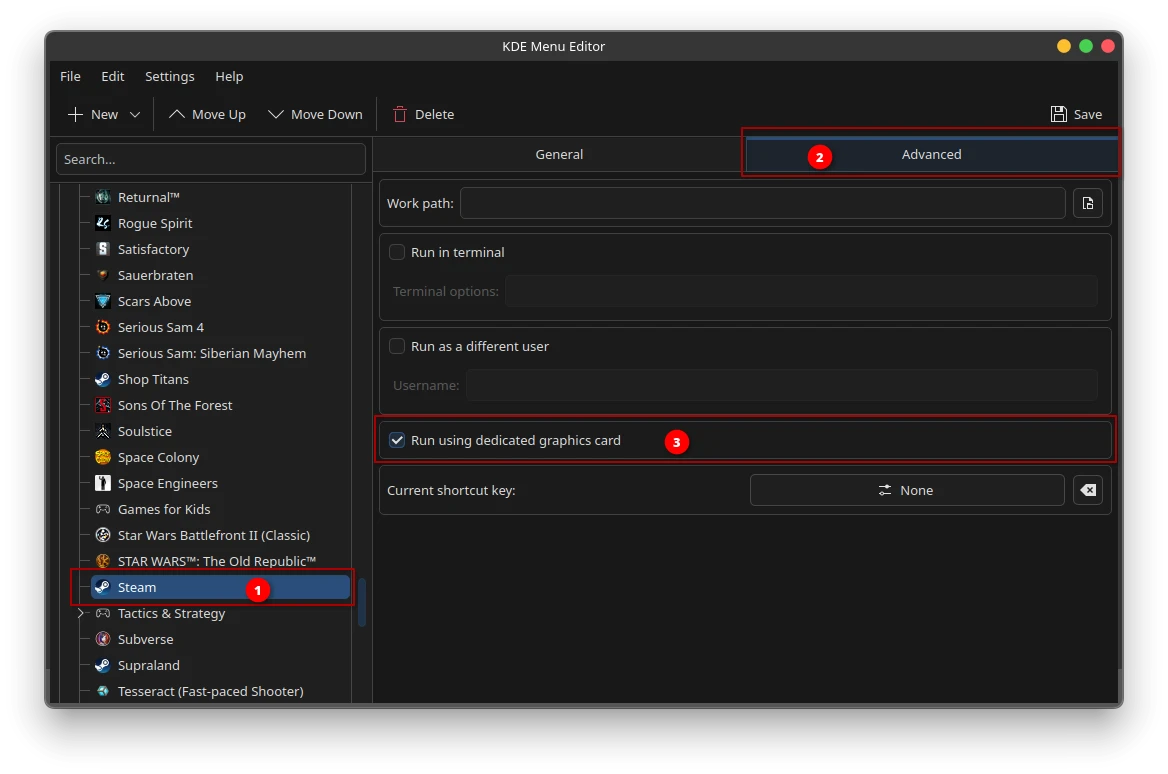
On KDE it's not quite so elegant. There you have to edit the menu entry and under "Advanced" enable the option "Run with dedicated graphics card" and save.
If you want to develop an application yourself that already handles this for the user, it's sufficient to set PreferNonDefaultGPU=true in the corresponding desktop file. Your application will then be automatically offloaded to a dedicated graphics card on most desktops, provided one is available.
![A screenshot of the Kate text editor on Linux, displaying the contents of the com.valvesoftware.Steam.desktop file, a desktop entry configuration file for the Steam Flatpak application. Two lines are highlighted with numbered red callout badges: badge 1 points to the [Desktop Entry] section header on line 1, and badge 2 highlights PrefersNonDefaultGPU=true on line 11, which is a key setting that instructs the system to run Steam on a dedicated GPU rather than the integrated one.](/img/igpu-7800x3d/desktop-file-prefer-non-default-gpu.webp)
For the console junkies among you: You can also set these environment variables, then an application or game will also start on the dGPU: __NV_PRIME_RENDER_OFFLOAD=1 __GLX_VENDOR_LIBRARY_NAME=nvidia __VK_LAYER_NV_optimus=NVIDIA_only.
The Setup and Its Little Flaws
The setup worked. Mostly. Until the iGPU decided to simply die.
A typical day looked like this: Everything runs. System stable. Then, without warning: Freeze. No mouse pointer, no keyboard input, nothing. Or: The system runs seemingly without problems after a kernel update, but the next day there's no video signal over HDMI anymore. Simply gone. Device present, signal not.
AMD and the Mesa developers tackled the problem. There were firmware updates from AMD, aimed at stabilizing the iGPU. You can read about the corresponding discussions and patches in the bug trackers:
Integrated AMD GPU randomly resets and crashes desktop - Bugzilla openSUSE
The system dies when watching HW accelerated YouTube videos in Firefox - Freedesktop Gitlab
"The most common cause for page flip timeouts has been fixed in kernel 6.18.44, 7.1.8, and 7.2-rc7."
The firmware updates helped, at least it always looked that way at first. The system ran stable until it started causing the same problems again, which then occurred more and more frequently. Since I've been using a rolling release for years, I'm inevitably always on the latest kernel and latest firmware. Nevertheless, what has simply worked in so many other situations unfortunately didn't help here.
Now imagine someone with a point release and an older kernel has this problem. Until the next distribution update, the iGPU simply remains unusable. Maybe even in the next release. And the one after that. Then a few years have already passed. If this problem has existed for more than two years even on a rolling release, that speaks volumes.
A small aside to support my argument for why I reject point releases on desktop systems. More on that here and here.
NVIDIA Doesn't Sleep
While I've been spending my mornings reading dmesg | grep -i amdgpu like other people drink their coffee, something remarkable happened at NVIDIA: They simply got their driver in order.
Explicit Sync? Supported. Wayland stability? Significantly improved. Tearing, out-of-order frames, all those old problems? Largely history. I've been using NVIDIA on Linux with Wayland for over six years now, and it's been production-ready for quite some time. There were occasional stumbling blocks, the explicit sync stuff was the worst of them, but that got fixed.
And that's exactly where the bitter irony of the story lies: The original reason why I wanted to use the iGPU as the primary display adapter in the first place has vanished into thin air. NVIDIA solved the problem on their end. Faster than AMD and Mesa got the iGPU of the 7800X3D under control. Which is particularly noteworthy because NVIDIA is actually known for taking a very long time with driver repairs.
Current Status: Given Up (For Now)
After I read the message in the bug tracker saying that the common timeout issues should be fixed, I immediately re-enabled the iGPU in the BIOS, plugged the monitors back in, and tested. All good, no timeouts at first. But since it was already late, I wanted to postpone the long-term test to the next day. In the morning: no video signal over HDMI. DisplayPort worked fine, HDMI didn't.
Could also be related to the recent HDMI 2.1 enablement patches from AMD. Even though these are only planned for Linux Kernel 7.2, which at the time of this article had not yet been released. Because the monitor is detected, and resolution and supported refresh rate are also displayed in the system. The picture just remains black. The monitor doesn't go into standby, which means it's receiving some signal from the system. Just not one with an image. Another suspicion that suggests itself is that I had always disabled the iGPU completely before, so it wasn't even recognized by the system, as if the device wasn't physically present. Since I've re-enabled it, it's possible that firmware for the device was loaded at the time of the first test, which is now on the device.
I have other AMD GPUs, including similar integrated graphics chips, that have never shown remotely such problems. That leads me to an uncomfortable suspicion: Maybe, just maybe, something is defective in my specific 7800X3D chip. That would be unfortunate, but it would explain why other systems with comparable hardware have no problems whatsoever. While I'm sitting here reading bug reports like other people watch Netflix.
For anyone experiencing similar problems: Check your kernel logs, keep Mesa up to date, and verify that you have the latest AMD firmware installed. For everyone else: If you want a stable Wayland setup with an NVIDIA card, the current driver is significantly better than its reputation from previous years.
At the time of this article, I'm running NVIDIA driver 595.84. That makes me wonder what openSUSE is doing, and when the driver 595.91.07 released on August 3rd will make it into the repos.

Released eight days ago, not yet landed in the repos. Well, it should be sorted out in the next few days.
I'm relying completely on NVIDIA for now. And the strangest thing about it is: It simply works. Contrary to the general opinion when it comes to graphics cards and Linux.